 Little Artbook
Best Artkive Alternatives in 2026: Save Kids' Art Privately Without Forced Print Subscriptions
Artkive made the idea of digitizing children's drawings mainstream—and if you want to stuff a cardboard box with preschool art and pay someone else to photograph and print a coffee-table book, it still does that job well.
But many parents looking for an Artkive alternative simply want a clean, private digital home for their kids' drawings on iPhone or iPad—without creating an account, uploading family memories to third-party servers, or getting nudged toward expensive printed-book upsells every month.
- Best private iPhone/iPad kids art organizer: Little Artbook (no account, zero ads, auto paper-crop & brightening, 60s voice stories, private iCloud sync, printable A4 PDFs).
- Best for extended-family social sharing: Keepy (cloud albums with grandparent video/audio comments).
- Best $0 DIY route if you don't mind manual folders: Apple Photos or Google Photos shared albums.
- Best physical minimalism combo: Two rotating oak wall frames + a private digital archive.
Why Parents Look for an Artkive Alternative
- Privacy & data ownership: Many parents prefer not to create a cloud account or store photos of their children's artwork and names on third-party startup servers.
- Print-book upsells: Not every family wants to pay $75–$150+ per printed book every year. Being able to export a clean printable PDF and print locally (or stay 100% digital) saves hundreds over elementary school.
- Missing the voice behind the drawing: A photo shows a green squiggle; a 60-second recording of your 4-year-old explaining it is a dinosaur eating watermelon is priceless.
- Long-term export freedom: Parents want assurance that even if they stop paying, their original high-resolution artwork images remain on their own device.
Side-by-Side Comparison: Top 5 Artkive Alternatives
| Option | Little Artbook | Keepy | Apple Photos | Google Photos | Wall Frames + Bin |
|---|---|---|---|---|---|
| Account Required | No (zero sign-up) | Yes | Apple ID | Google Account | None |
| Where Art Lives | On-device & your private iCloud | Keepy cloud servers | On-device & iCloud | Google cloud | Physical closet / wall |
| Auto Crop & Paper Brighten | Yes (crayon-safe, reversible) | Basic photo upload | Manual crop only | Basic edit tools | N/A |
| Voice Stories & Auto Age | 60s audio + auto exact age | Video/audio + age | No | No | Handwritten on back |
| DIY Printable PDF Export | High-res A4 PDF (print anywhere) | Paid prints/books | Manual layout | Google Photo Books | Original paper only |
| Pricing | Free (30 drawings + 3 voice notes); Monthly / Yearly (7-day trial) / Lifetime + Family Sharing | Subscription for full storage | Free (iCloud quota) | Free (15 GB shared) | $30–$60 one-time |
Detailed Breakdown of Each Artkive Alternative
1. Little Artbook (iPhone & iPad)
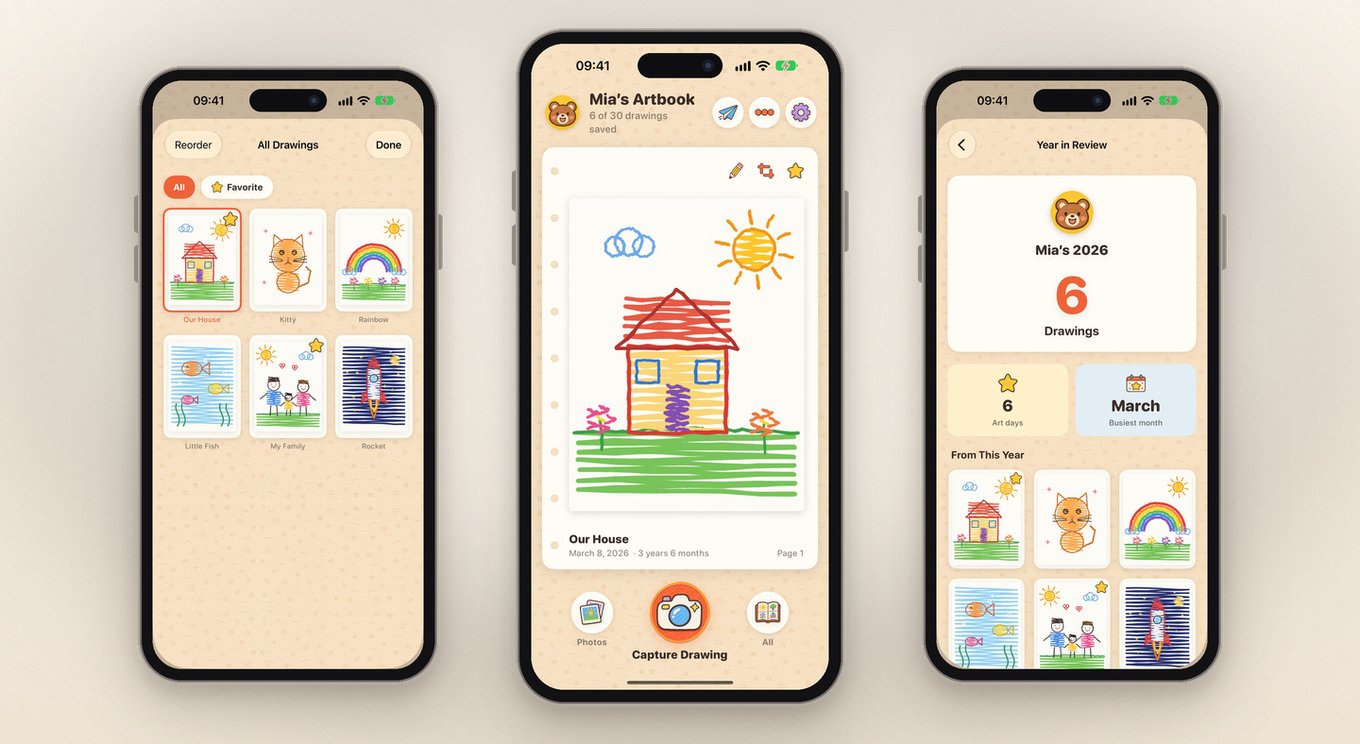
Best Overall Private AlternativeLittle Artbook was built by a solo indie developer specifically for parents who want the warmth of a childhood storybook without the noise, ads, or third-party cloud lock-in of subscription print services.
- Standout strengths: 2-second automatic paper edge detection and perspective straightening; reversible Paper Brightening tuned to preserve crayon and watercolor vibrance; automatic child age calculation from birthday; 60-second voice notes; batch import of up to 20 older photos from Apple Photos preserving original EXIF dates; museum-style White Mat & Wood Frame cards; Year in Review recaps; Home Screen/StandBy widgets; and printable A4 PDF albums.
- Privacy: App Privacy label is literally Data Not Collected—no account, no developer servers, no ads, and optional sync through your own private Apple iCloud.
- Honest limitations: iPhone & iPad only (no Android app yet), and it does not ship physical printed books directly—you export the A4 PDF and print wherever you like.
- Pricing: Free forever up to 30 drawings & 3 voice notes; optional Premium ($9.99/mo, $49.99/yr with 7-day free trial, or $99.99 one-time Lifetime) with Apple Family Sharing included. Even if you cancel, all saved drawings stay on your device and remain exportable.
2. Keepy
Best for Grandparent Social SharingKeepy focuses heavily on turning kids' artwork and schoolwork into a private family feed where grandparents and relatives can leave voice or video reactions.
- Pros: Fun interactive reactions for long-distance grandparents; available on both iOS and Android; supports video stories.
- Cons: Requires creating a cloud account and storing family art on third-party servers; unlimited storage requires an ongoing paid subscription; interface feels more like a social feed than a calm digital gallery.
3. Apple Photos Shared Albums
Best $0 Built-In OptionIf you already use an iPhone and want zero new apps, creating a dedicated album called "Mia's Art 2026" inside Apple Photos is completely free.
- Pros: $0 extra cost, already backed up in iCloud, easy to share with relatives who use iPhones.
- Cons: Every photo still clutters your main camera roll timeline; raw tabletop photos stay crooked with yellow indoor lighting unless you manually crop every single sheet; no automatic child age tracking; and no built-in way to attach a voice story to a drawing.
4. Google Photos
Best Cross-Platform Free SearchFor mixed iPhone + Android households, Google Photos makes searching by keyword (like "dinosaur" or "rainbow") effortless across devices.
- Pros: Works seamlessly across iOS, Android, and desktop web; strong visual search; built-in option to order simple Google Photo Books.
- Cons: Shares your 15 GB Google storage quota; drawings mix into your main photo stream; lacks dedicated paper-edge scanning tuned for kids' art, child age badges, or audio notes.
5. Rotating Wall Frames + One Slim Keepsake Binder
Best Physical PairingPhysical storage alone quickly overflows closets, but pairing two front-opening oak wall frames (holding the current week's top two pieces) with a quick digital scan of everything else is the gold standard for minimalist homes. See our full 3-step guilt-free kids artwork decluttering guide for the exact weekly routine.
Frequently Asked Questions
What is the best private Artkive alternative for iPhone and iPad?
Little Artbook is the best private Artkive alternative for iPhone and iPad parents who do not want to create an account or upload their child's drawings to third-party servers. Everything stays locally on your device and optionally syncs via your own Apple iCloud, with auto paper-cropping, exact child age tracking, 60-second voice notes, and DIY printable A4 PDF albums.
Is there a free alternative to Artkive?
Yes. If you want a completely free DIY workflow and don't mind manual folders, Apple Photos or Google Photos albums cost nothing beyond your existing cloud storage. If you want a dedicated kids art organizer with auto-cropping, exact age badges, and voice stories, Little Artbook includes a free forever tier for up to 30 drawings and 3 voice notes with no account required.
Can I print a physical kids art book without using Artkive?
Yes. Instead of paying premium print-service markups inside Artkive, Little Artbook lets you export high-resolution A4 PDF keepsake albums that you can print at home, bind locally, or upload to any print shop you prefer.
When is Artkive still the better choice?
Artkive is still the strongest option if you specifically want a done-for-you physical box service where you mail your child's paper artwork away to be professionally photographed and bound into a hardcover coffee-table book.
Try a Quieter, More Private Way to Save Kids' Art
Start with 30 drawings and 3 voice stories completely free on iPhone & iPad—no account, no ads, and a 7-day free trial if you ever upgrade to Yearly.
Download Little Artbook on App Store